How to disable a surveillance camera?
How to disable a surveillance camera?
Context
You bought a Wi-Fi surveillance camera to secure your home. With it, you can check on your cat. If someone breaks in, they’ll be recorded, and thanks to AI, you can even get a notification on your phone telling you a person was spotted in your hallway.
You feel safe. But is it possible to disable this camera without accessing your Wi-Fi network? In order to break in and then reactivate it without leaving a trace? Can you really count on your Wi-Fi camera to always do its job?
In this article, we’ll see how to passively detect a home Wi-Fi surveillance camera, then disable it without connecting to the Wi-Fi network.
This attack works well against entry-level home surveillance cameras because they are almost always Wi-Fi only and rarely support PMF.
Before going further, a quick legal reminder:
Accessing an automated data processing computer system without the owner’s permission is illegal.
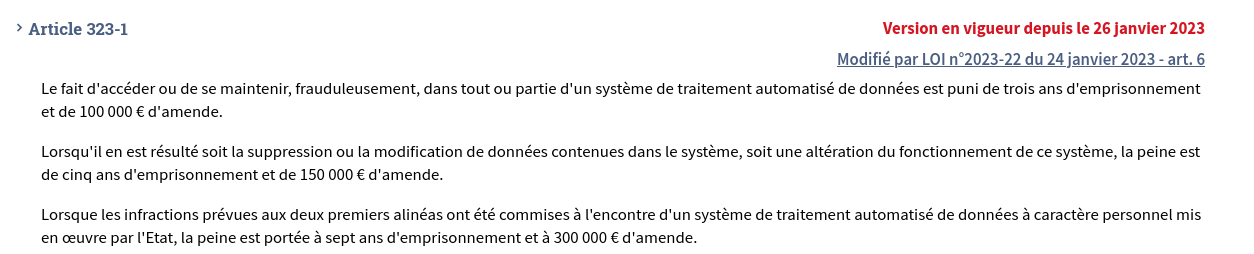
This applies regardless of the reason and regardless of the system. The demonstrations shown here were performed on hardware I own.
Do not reproduce these steps without written authorization.
Detecting a Wi-Fi Camera
Imagine this scenario: you need to know if a surveillance camera is active on a Wi-Fi network where you only know the SSID, not the password. No connection possible, so no port scanning.
That’s not a problem: we can passively sniff Wi-Fi frames.
Why this is possible
In the 802.11 standard, access points periodically broadcast (several times per second) beacon frames. These frames contain the SSID, the BSSID (the AP’s MAC address), the channel, and some network parameters. They are transmitted in plaintext, regardless of data encryption (WPA2, WPA3).
Similarly, the headers of 802.11 data frames contain the source and destination MAC addresses and the BSSID, in plaintext. A Wi-Fi adapter in monitor mode (like the well-known Alpha card) can observe all stations associated with an access point without knowing the network key.
Identify the access point
First, we need to list the Wi-Fi access points around us to find the channel and BSSID of the target network.
1
2
sudo airmon-ng start wlan0
sudo airodump-ng wlan0mon
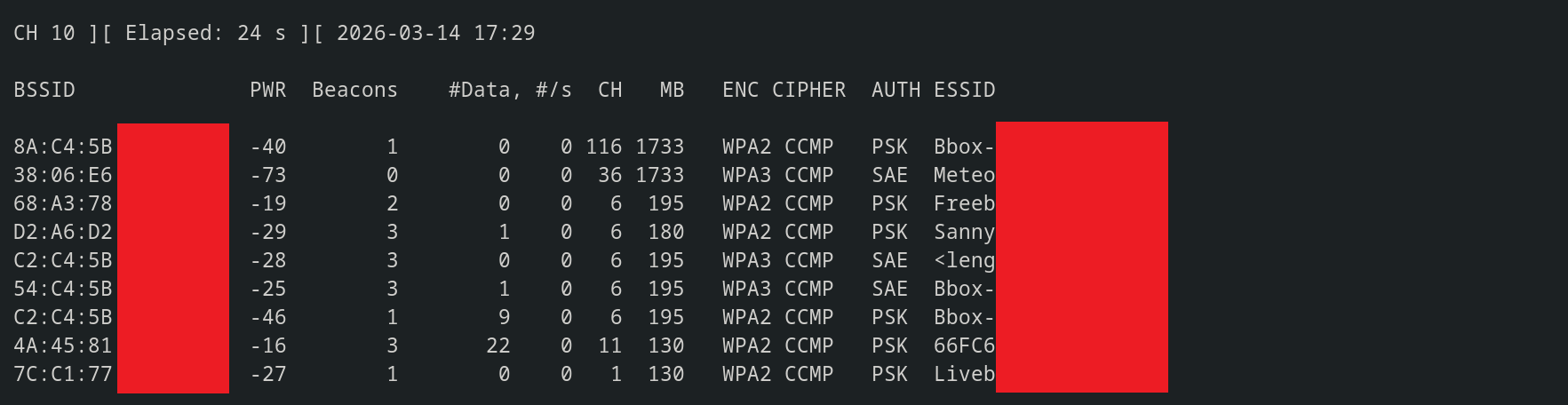
The target network appears in the list. We can grab its BSSID and channel.
List connected stations
We can now list the devices connected to this access point:
1
sudo airodump-ng --bssid <TARGET_BSSID> --channel <CH> wlan0mon
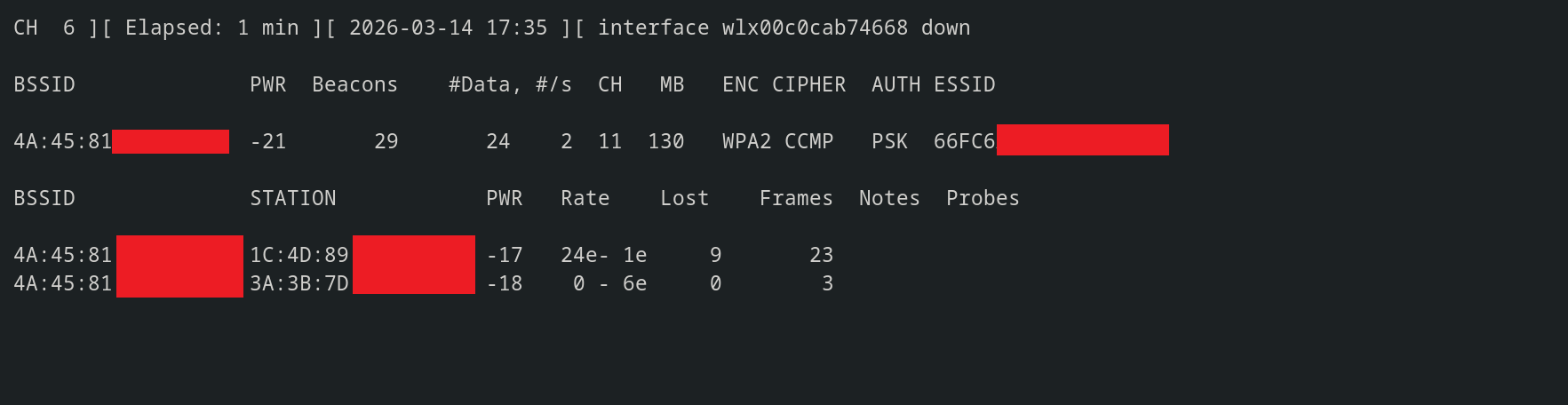
This shows two stations.
The first has address: 1C:4D:89:XX:XX:XX The second: 3A:3B:7D:XX:XX:XX
Identify which one is the camera
The first 24 bits of a MAC address make up the OUI (Organizationally Unique Identifier). A lookup in the IEEE database gives the manufacturer.
First, you need to check that the address is not randomized. If the second least significant bit of the first byte is 0, then the MAC address is not randomized and it’s worth searching the IEEE database.
In our case:
1C:4D:89:XX:XX:XX: 0x1C = 00011100, the randomization bit = 0. The MAC address is not randomized.
3A:3B:7D:XX:XX:XX: 0x3A = 00111010, the randomization bit = 1. The MAC address is randomized.
Now that we know the address is not randomized, we can look up the manufacturer:
https://macaddresslookup.io/fr?search=1C-4D-89
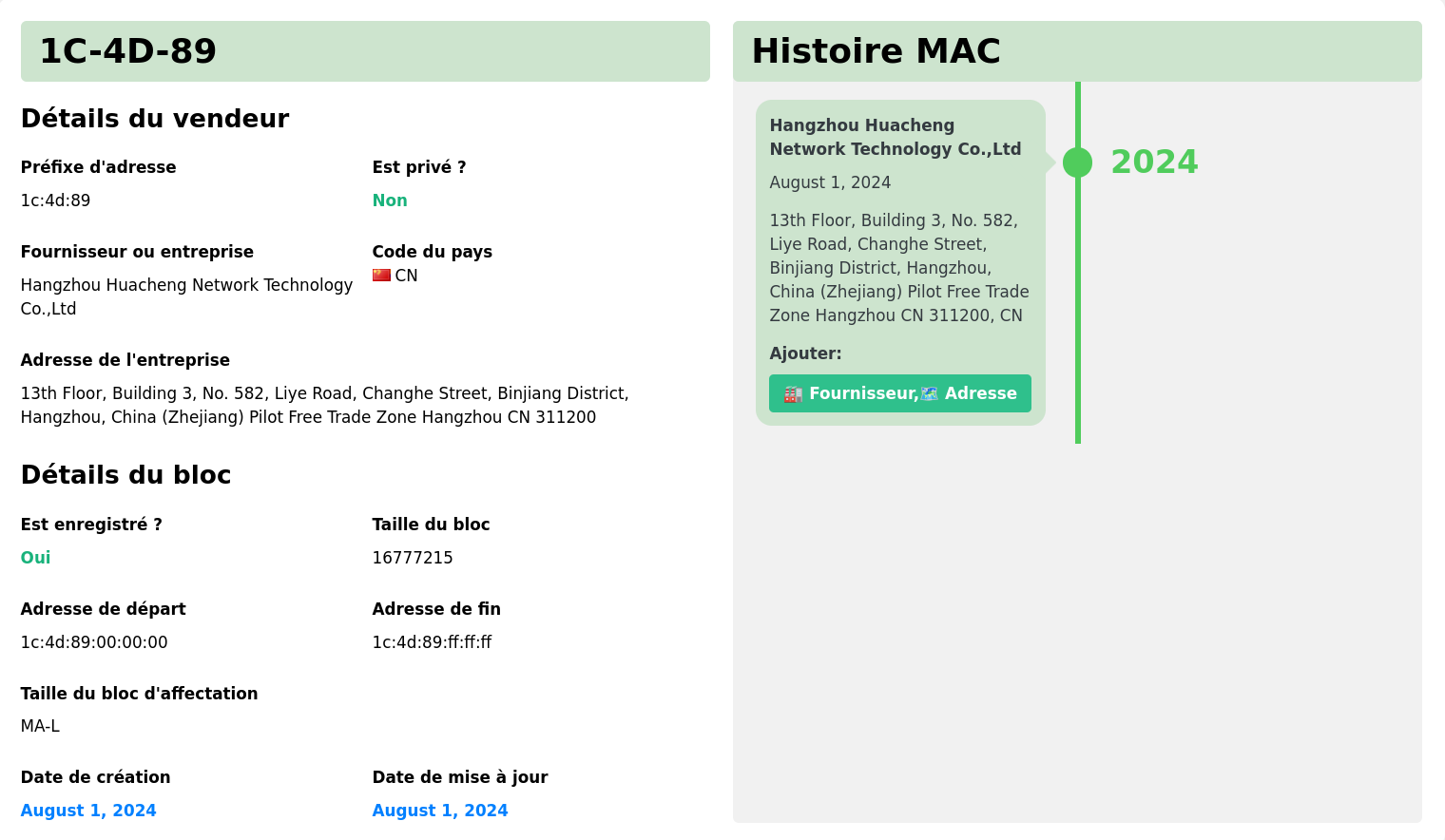
If the OUI pointed to a general-purpose manufacturer like TP-Link (Tapo), which also sells smart plugs and routers, the manufacturer alone wouldn’t be enough to confirm it’s a camera.
To be sure it’s a camera, we’ll analyze the frequency of frames sent and received by the device.
Frame volume analysis

A surveillance camera streaming video continuously will send a very large number of packets. A robot vacuum or a smart bulb, on the other hand, sends or receives far fewer.
Given the frame rate observed on station 1C:4D:89:XX:XX:XX, we can be fairly confident it’s a camera.
Disabling the Camera
Now it’s time to stop the camera from transmitting its stream. To do this, we’ll continuously inject 802.11 deauthentication frames.
Why it works
In the 802.11 standard, deauthentication frames are notifications: any station that receives one must comply and disconnect. These management frames are neither encrypted nor authenticated. Anyone can send them toward a Wi-Fi network without being connected to it.
However, if PMF (Protected Management Frames) is enabled on the router, this attack won’t work. The advantage in our case is that most home networks don’t have this setting enabled. Also, very few consumer cameras support it.
The camera keeps a persistent connection (WebSocket or MQTT) to the manufacturer’s cloud server. This channel carries the live video stream, detection notifications, and control commands (pan/tilt, activation, etc.). The smartphone connects to the same cloud through the mobile app.
When the camera is deauthenticated, it loses its Wi-Fi connection to the router. The whole chain breaks:
- The video stream is no longer sent to the cloud, so it’s no longer visible in the app.
- Notifications (person detection, motion) can no longer be sent.
- The camera can no longer be controlled remotely.
- Even if the camera detects an intruder locally, it can’t send the alert.
Let’s disconnect the camera from the network and prevent it from reconnecting:
1
sudo aireplay-ng --deauth 0 -a <AP_BSSID> -c <CAMERA_MAC> wlan0mon
The --deauth 0 parameter sends frames in an infinite loop. The camera disconnects from the network and cannot reassociate as long as the injection is running.
I intentionally blurred the left side of the video, the part showing my PC. The reason is simple: the command leaks information about my Wi-Fi network (BSSID and SSID) which, combined with an API like Wigle, could be used to find my address. The redaction in this video isn’t effective enough, so I preferred the blunt approach and blurred the whole thing.
On the right, you can see the camera’s mobile app. Before the attack, everything is fine: the camera is streaming and we can control it from the phone.
As soon as I launch the attack, the camera feed freezes. You can even see the camera’s clock stop because it’s no longer sending video.
Once the injection stops, the camera automatically reassociates with the access point and everything works again as if nothing happened.
Mitigations
802.11w: Protected Management Frames (PMF)
The IEEE 802.11w amendment adds protection for management frames. When this protection is negotiated between the AP and the client, spoofed deauthentication frames are rejected. This setting can be enabled in WPA2, and in WPA3 it is on by default.
Many consumer routers offer this setting, but most entry-level consumer cameras don’t support it.
For the protection to work, PMF must be enabled on both the camera and the router.
Local recording on SD card
If local recording is enabled (via a micro-SD card), the video stream continues to be stored locally even without Wi-Fi connectivity. The intruder will be filmed, but the owner won’t receive any real-time alert.
Ethernet / PoE connection
The deauthentication attack is specific to the 802.11 protocol. A camera connected over Ethernet is completely immune to it. Attacks to block the stream of a wired camera are possible, but they require being inside the network.
Deauthentication frame detection
A WIDS (Wireless Intrusion Detection System) can monitor management frames and alert when a deauthentication flood is detected. Detection doesn’t prevent the attack but can notify the owner that something unusual is happening.